- Empty cart.
- Continue Shopping

How I Made My MO Robot’s Eyes Come Alive: Step-by-Step Guide
- Posted on
HASHIM admin
- Categories: Robotics

Robots are fun, but what really brings them to life is expressive eyes. Recently, I created my MO robot, and many people asked me how I made the eyes blink, move, and show emotions. Today, I’m sharing the full process!
What You’ll Need
Before we start, here’s what I used for the MO robot eyes project:
- OLED Display – to show the eye animations.
- Arduino Nano – the brain behind the display.
- Breadboard & Jumper Wires – for easy connections.
- Laptop – to write and upload the code.
- ChatGPT – to help generate and refine the code for the eye expressions.
Step 1: Connecting the Components
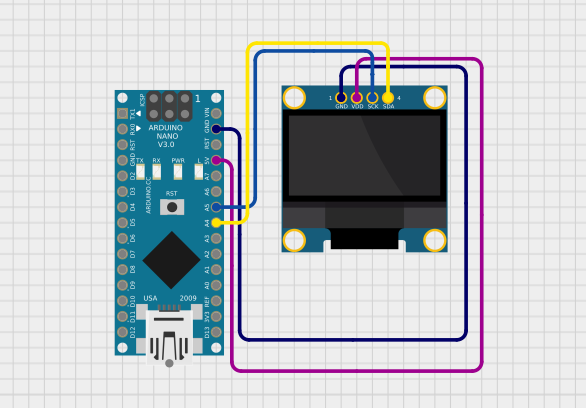
The first step was connecting everything on the breadboard. Using male-to-female jumper wires, I connected the OLED display to the Arduino Nano. It’s a simple setup, but it’s important to make sure all connections are secure.
Tip: Double-check the pins for SDA, SCL, VCC, and GND – wrong connections can prevent the display from working.
Step 2: Writing the Code
Once the hardware was ready, I moved to the coding part. I used Arduino IDE and asked ChatGPT to help me generate code for different eye animations.
The code includes:
- Blinking eyes
- Looking around
- Different emotional expressions
After tweaking the animations, I uploaded the code to the Arduino Nano. And just like that, the eyes came alive!
Step 3: Seeing the Magic
With everything connected and the code uploaded, the OLED display started showing dynamic eyes. They could blink, move side to side, and even show emotions like happy or sleepy.
It’s amazing how a few simple components and some creative coding can make a robot so expressive!
Step 4: Try It Yourself
I’ve uploaded the full code, connection diagram, and detailed instructions on my website. If you want to build your own MO robot eyes, head over there and get started today.
#include
#include
#include

#define SCREEN_WIDTH 128
#define SCREEN_HEIGHT 64
Adafruit_SSD1306 display(SCREEN_WIDTH, SCREEN_HEIGHT, &Wire, -1);

// Eye positions
int leftX = 10;
int rightX = 78;
int eyeY = 35;  // Lower alignment

// Draw Normal Eyes
void normalEyes(int lx, int rx) {
  display.clearDisplay();
  display.fillRect(lx, eyeY, 40, 28, SSD1306_WHITE);
  display.fillRect(rx, eyeY, 40, 28, SSD1306_WHITE);
  display.display();
}

// Happy Eyes
void happyEyes(int lx, int rx) {
  display.clearDisplay();
  display.fillRoundRect(lx, eyeY, 40, 28, 10, SSD1306_WHITE);
  display.fillRoundRect(rx, eyeY, 40, 28, 10, SSD1306_WHITE);
  display.display();
}

// Love Eyes ❤️
void loveEyes(int lx, int rx) {
  display.clearDisplay();
  display.fillCircle(lx + 12, eyeY + 10, 8, SSD1306_WHITE);
  display.fillCircle(lx + 28, eyeY + 10, 8, SSD1306_WHITE);
  display.fillTriangle(lx + 4, eyeY + 14, lx + 36, eyeY + 14, lx + 20, eyeY + 28, SSD1306_WHITE);

  display.fillCircle(rx + 12, eyeY + 10, 8, SSD1306_WHITE);
  display.fillCircle(rx + 28, eyeY + 10, 8, SSD1306_WHITE);
  display.fillTriangle(rx + 4, eyeY + 14, rx + 36, eyeY + 14, rx + 20, eyeY + 28, SSD1306_WHITE);

  display.display();
}

// Angry Eyes (shiver effect)
void angryEyes(int lx, int rx) {
  for (int i = 0; i < 6; i++) {
    display.clearDisplay();
    int offset = (i % 2 == 0) ? -2 : 2;

    display.fillRect(lx + offset, eyeY, 40, 28, SSD1306_WHITE);
    display.fillRect(rx + offset, eyeY, 40, 28, SSD1306_WHITE);

    display.drawLine(lx + offset, eyeY - 5, lx + 40 + offset, eyeY - 15, SSD1306_WHITE);
    display.drawLine(rx + offset, eyeY - 15, rx + 40 + offset, eyeY - 5, SSD1306_WHITE);

    display.display();
    delay(100);
  }
}

// Sleepy Eyes
void sleepyEyes(int lx, int rx) {
  display.clearDisplay();
  display.fillRect(lx, eyeY + 10, 40, 5, SSD1306_WHITE);
  display.fillRect(rx, eyeY + 10, 40, 5, SSD1306_WHITE);
  display.display();
}

// Surprised Eyes 😲
void surprisedEyes(int lx, int rx) {
  display.clearDisplay();
  display.drawCircle(lx + 20, eyeY + 14, 14, SSD1306_WHITE);
  display.drawCircle(rx + 20, eyeY + 14, 14, SSD1306_WHITE);
  display.display();
}

void setup() {
  if (!display.begin(SSD1306_SWITCHCAPVCC, 0x3C)) {
    for (;;);
  }

  display.clearDisplay();

  // Show "HI" (big, centered)
  display.setTextSize(3);  // big font
  display.setTextColor(SSD1306_WHITE);
  display.setCursor(40, 20);  // roughly center
  display.println("HI");
  display.display();
  delay(2000);

  // Show "ZAIN" (big, at bottom)
  display.clearDisplay();
  display.setTextSize(3);
  display.setCursor(15, SCREEN_HEIGHT - 30); // near bottom
  display.println("ZAIN");
  display.display();
  delay(3000);
}

void loop() {
  // Normal eyes with left-right movement
  for (int i = 0; i < 3; i++) {
    normalEyes(leftX - 5, rightX - 5);
    delay(500);
    normalEyes(leftX + 5, rightX + 5);
    delay(500);
  }

  happyEyes(leftX, rightX);
  delay(3000);

  loveEyes(leftX, rightX);
  delay(3000);

  angryEyes(leftX, rightX);
  delay(3000);

  sleepyEyes(leftX, rightX);
  delay(3000);

  surprisedEyes(leftX, rightX);
  delay(3000);
}